Assessment Center IT Modernisation
One ready-made Windows installation, copied to every exam computer at the IDF's assessment center for colonels: identical, locked down and quick to restore.
- Idan Achrak — IT lead: image, setup kit, rollout; servers with Noam
- Noam Shadmi — Co-built the servers: domain, shared drives, Exchange
01 / The challenge
The assessment center for colonels is where the IDF assesses lieutenant-colonels for promotion to colonel. Candidates go through psychological tests and questionnaires, individual and group simulations and personal interviews, and the confidential results are one of the sources for promotion and placement decisions.
That puts the computers at the centre of a high-stakes day. Every candidate must get the same system, nothing may break or pop up in the middle of an exam, and a faulty computer has to be back in a known state quickly. Yet each computer was prepared on its own, one at a time, without one organised way to build it or restore it.
- High-stakes, confidential assessments of officers
- Every candidate needs an identical station
- Computers prepared one at a time
- No quick way back to a known state
02 / What I built
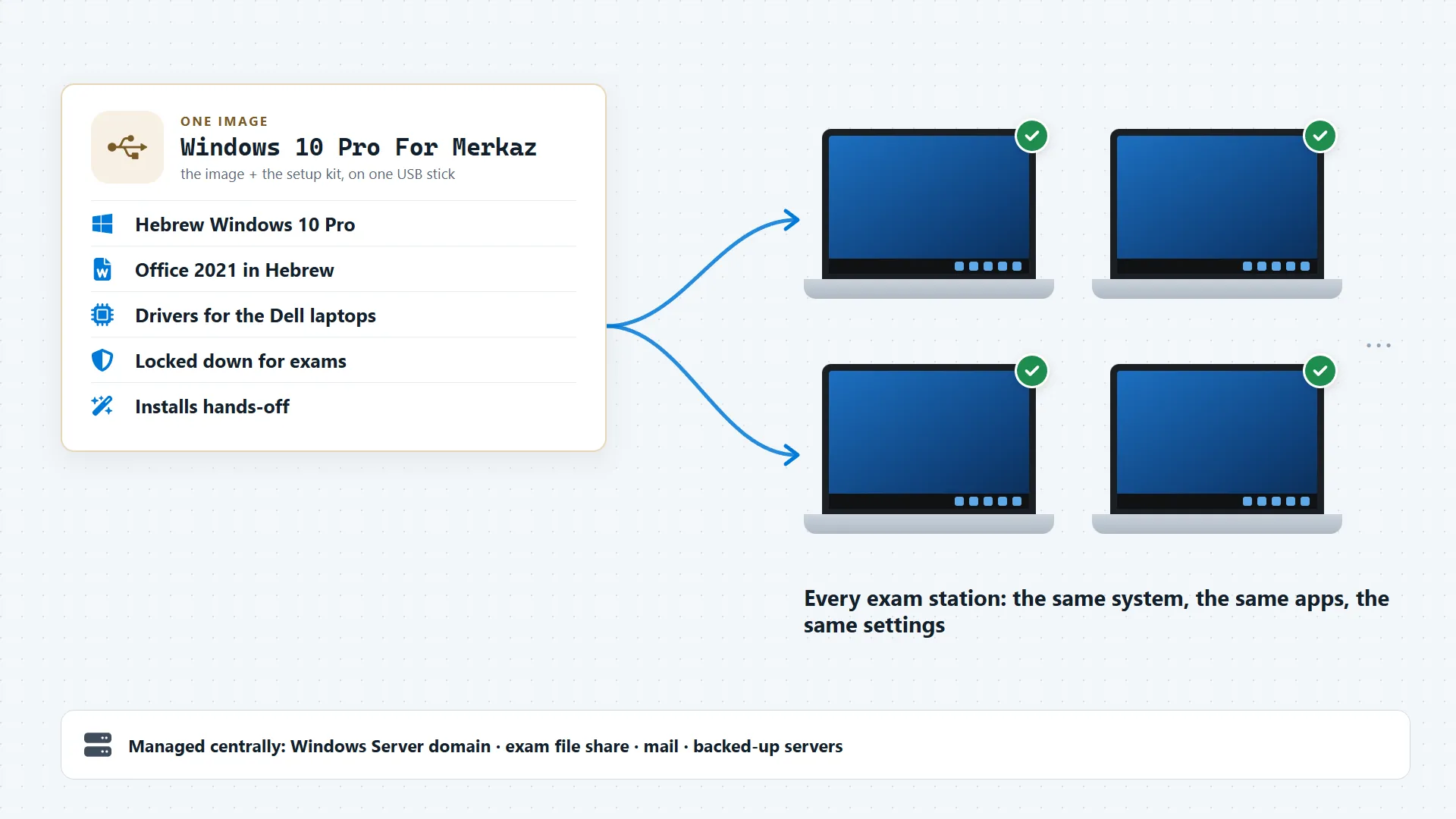
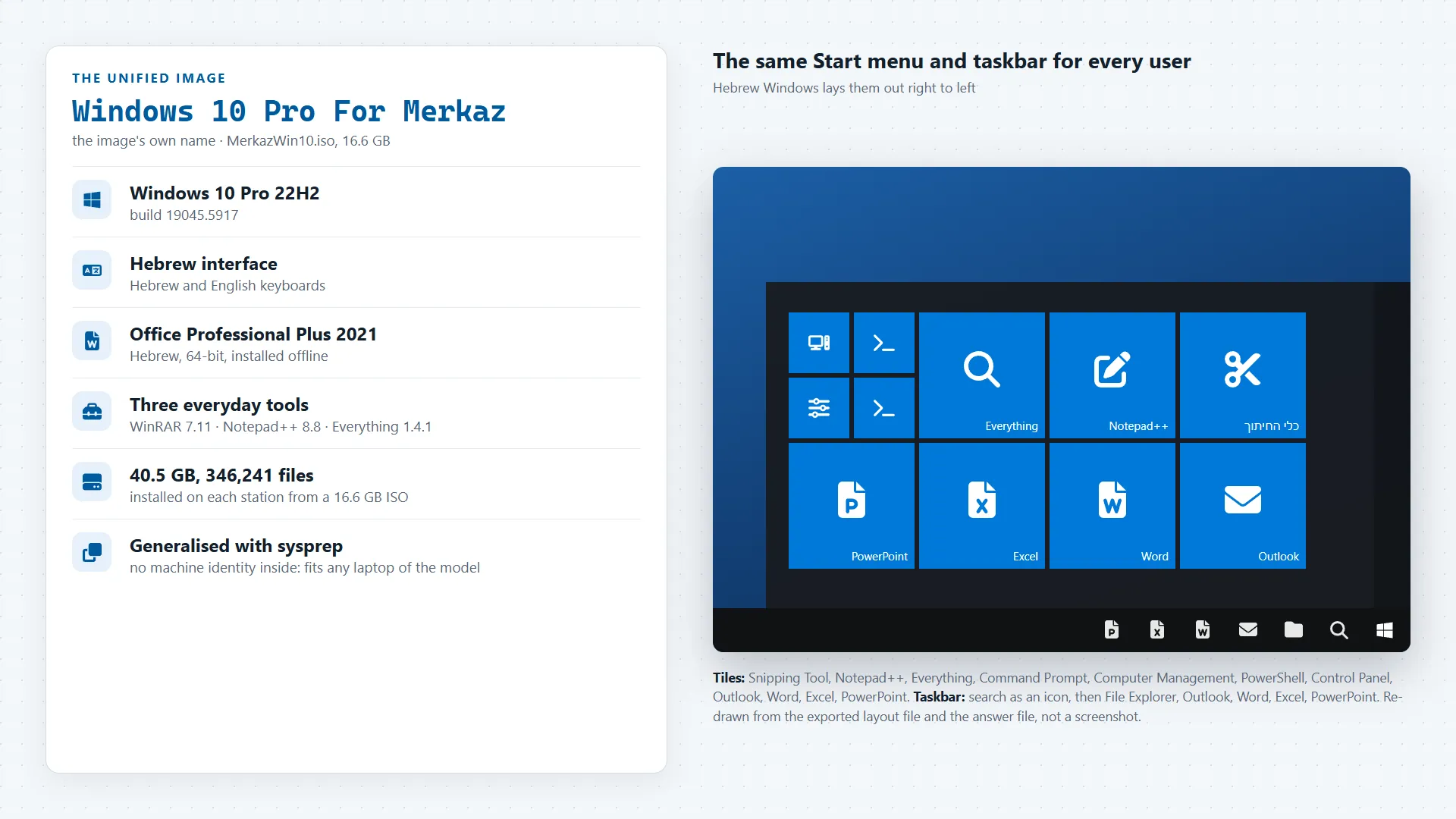
I moved everything that is the same on every computer into one unified Windows image: Hebrew Windows 10 Pro with Hebrew Office 2021, everyday tools, the same Start menu and taskbar, and exam-day settings built in. It installs from one USB stick with an answer file that answers every other setup question: the technician only picks the disk.
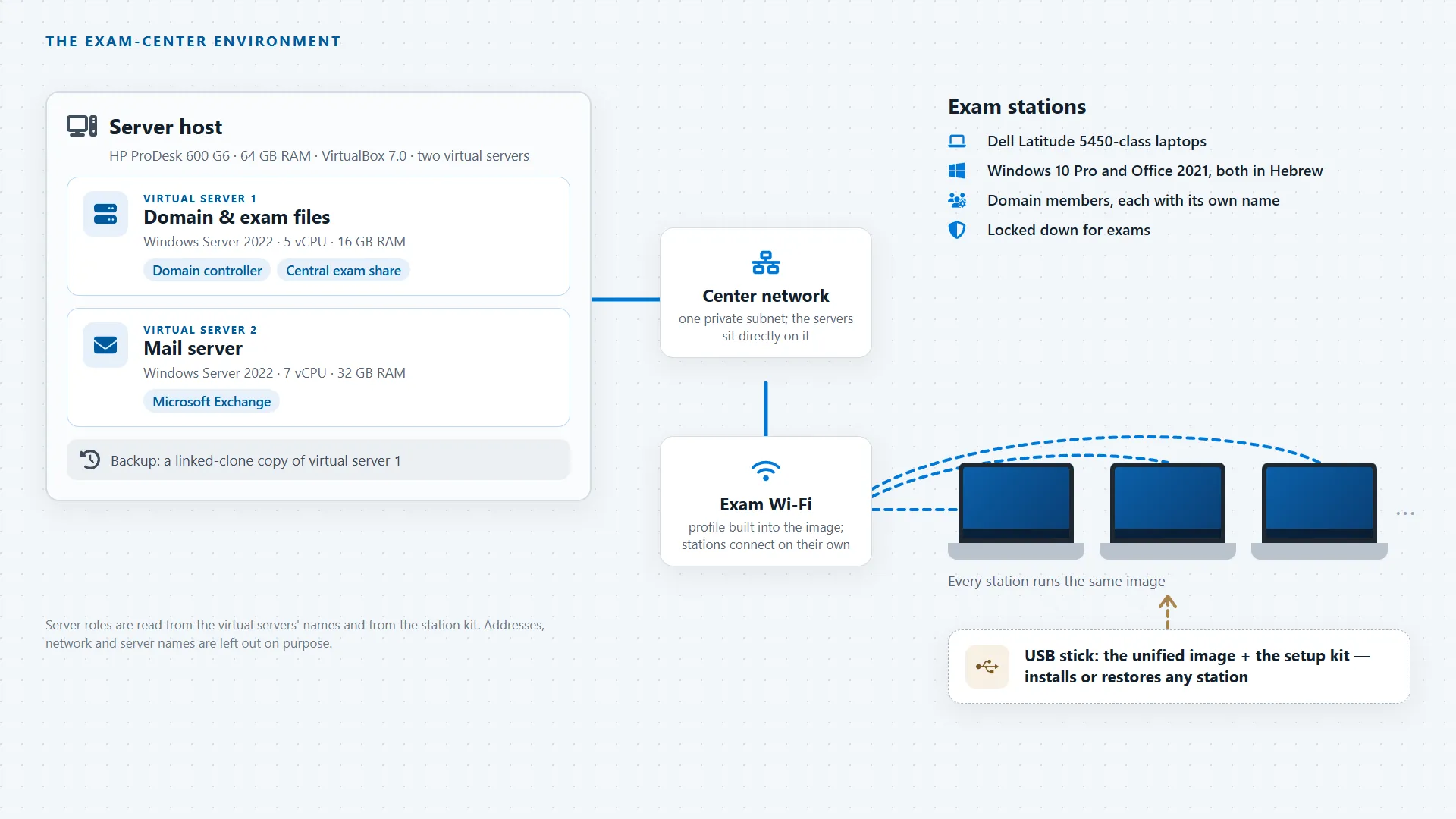
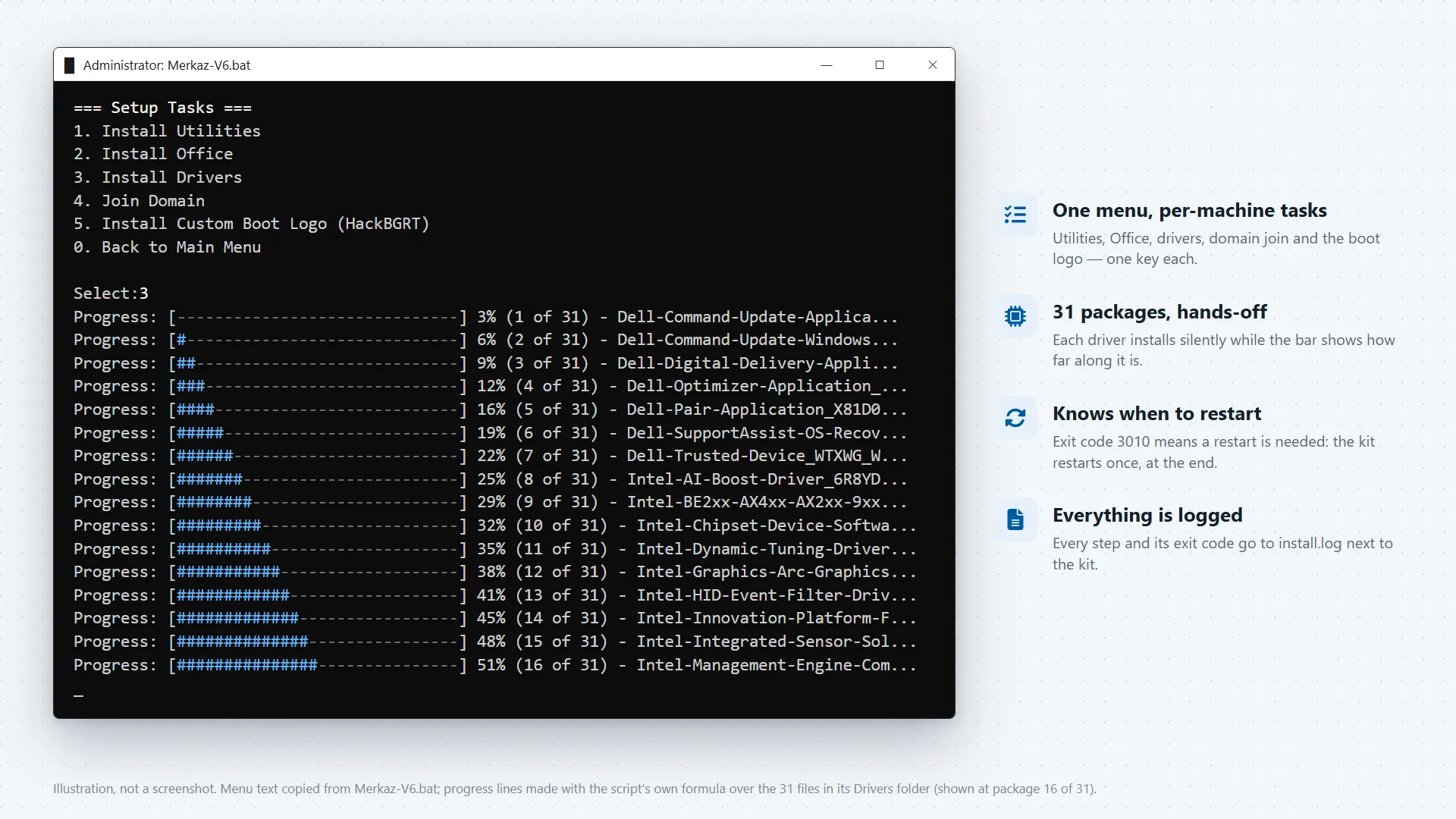
A short setup kit then does what differs from machine to machine: the station's own name and domain join, the IDF boot logo and a desktop-lockdown step, each one logged. Behind the stations is the server side, which Noam Shadmi and I set up together: a Windows Server domain controller, shared drives for the exam files and an Exchange mail server, running as virtual machines with a backup copy.
How it came together
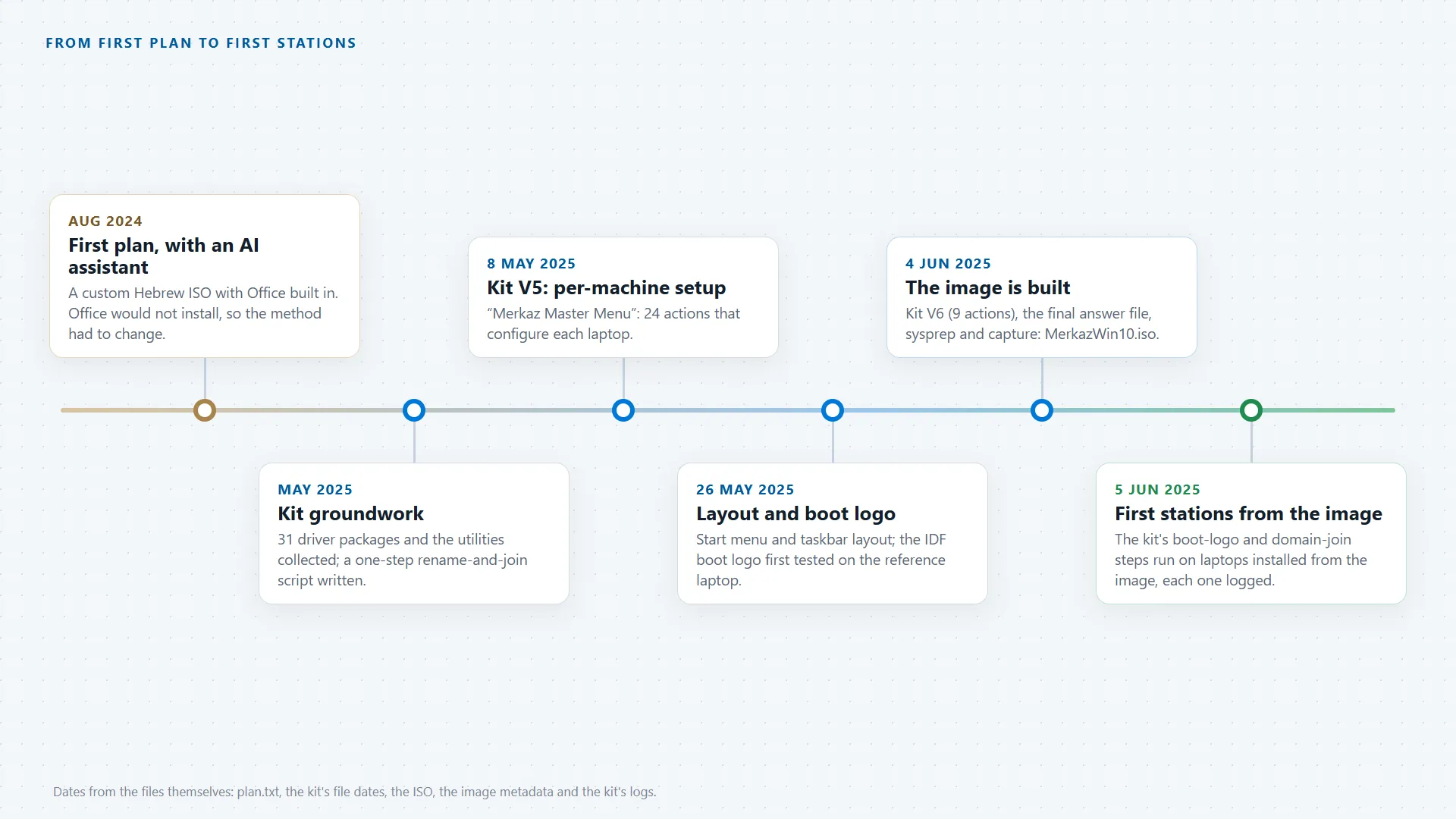
- Aug 2024First plan, with an AI assistantA custom Hebrew ISO with Office built in. Office would not install that way, so I changed the method.
- May 2025Kit groundwork31 driver packages and the everyday tools collected for offline install, and a script that renames a computer and joins the domain in one step.
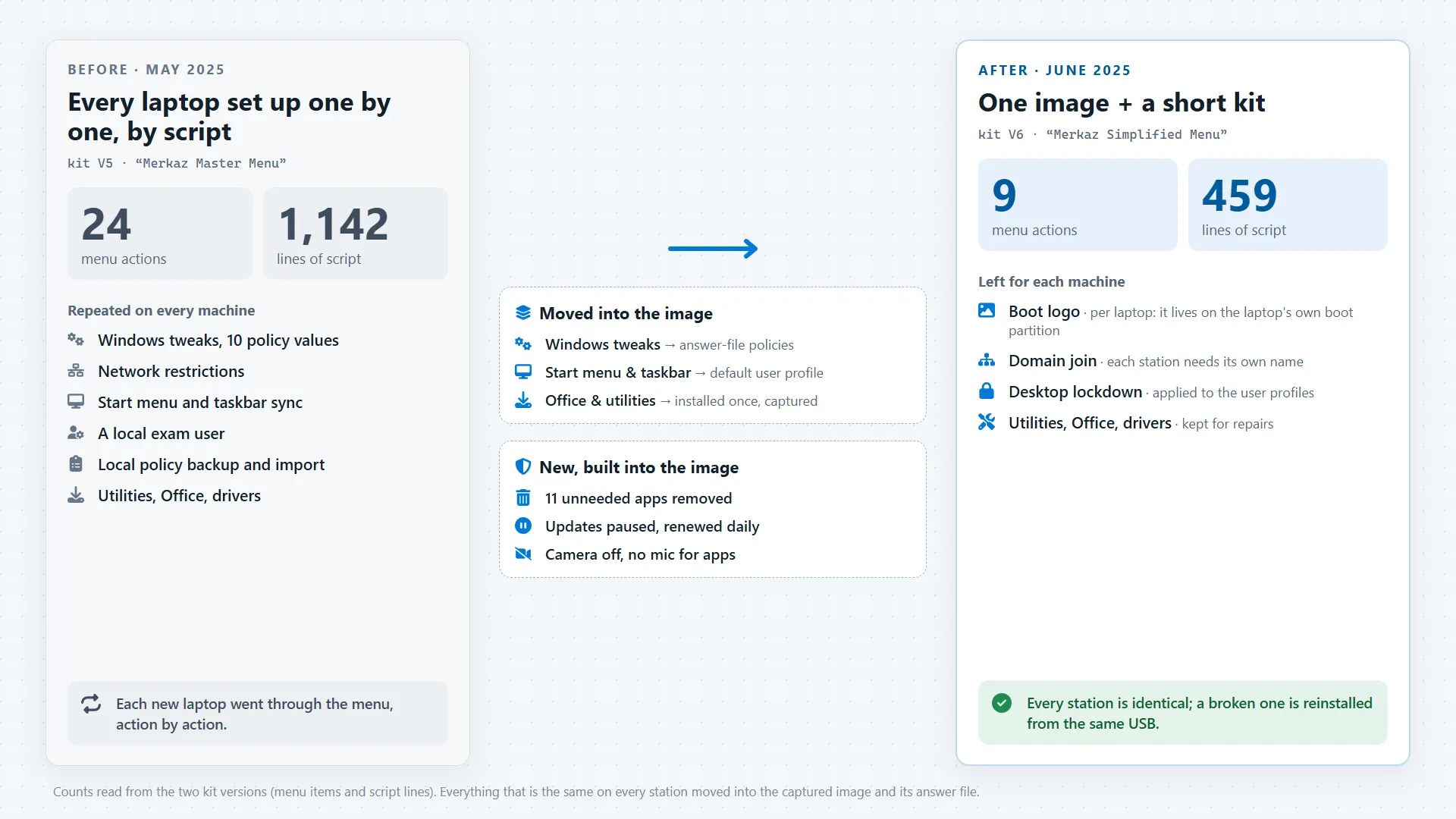
- 8 May 2025Kit V5: per-machine setupA 24-action menu that configured each laptop on its own. I tested it function by function and marked what worked.
- 26 May 2025Layout and boot logoThe shared Start menu and taskbar, and the IDF boot logo first tested on the reference laptop.
- 4 Jun 2025The image is builtKit V6 with 9 actions, the final answer file, sysprep and capture: a 16.6 GB bootable image, MerkazWin10.iso.
- 5 Jun 2025First stations from the imageLaptops installed from the image, then put through the kit's boot-logo and domain-join steps, each run logged.
03 / Highlights
One image, every station
Hebrew Windows 10 Pro and Hebrew Office 2021, with the same tools and settings, installed identically on every laptop from one USB stick.
Hands-off installation
Windows answers its own setup questions (language, keyboards, time zone, Wi-Fi and policies) from a prepared file while it installs. The technician only picks the disk.
A setup menu that records every step
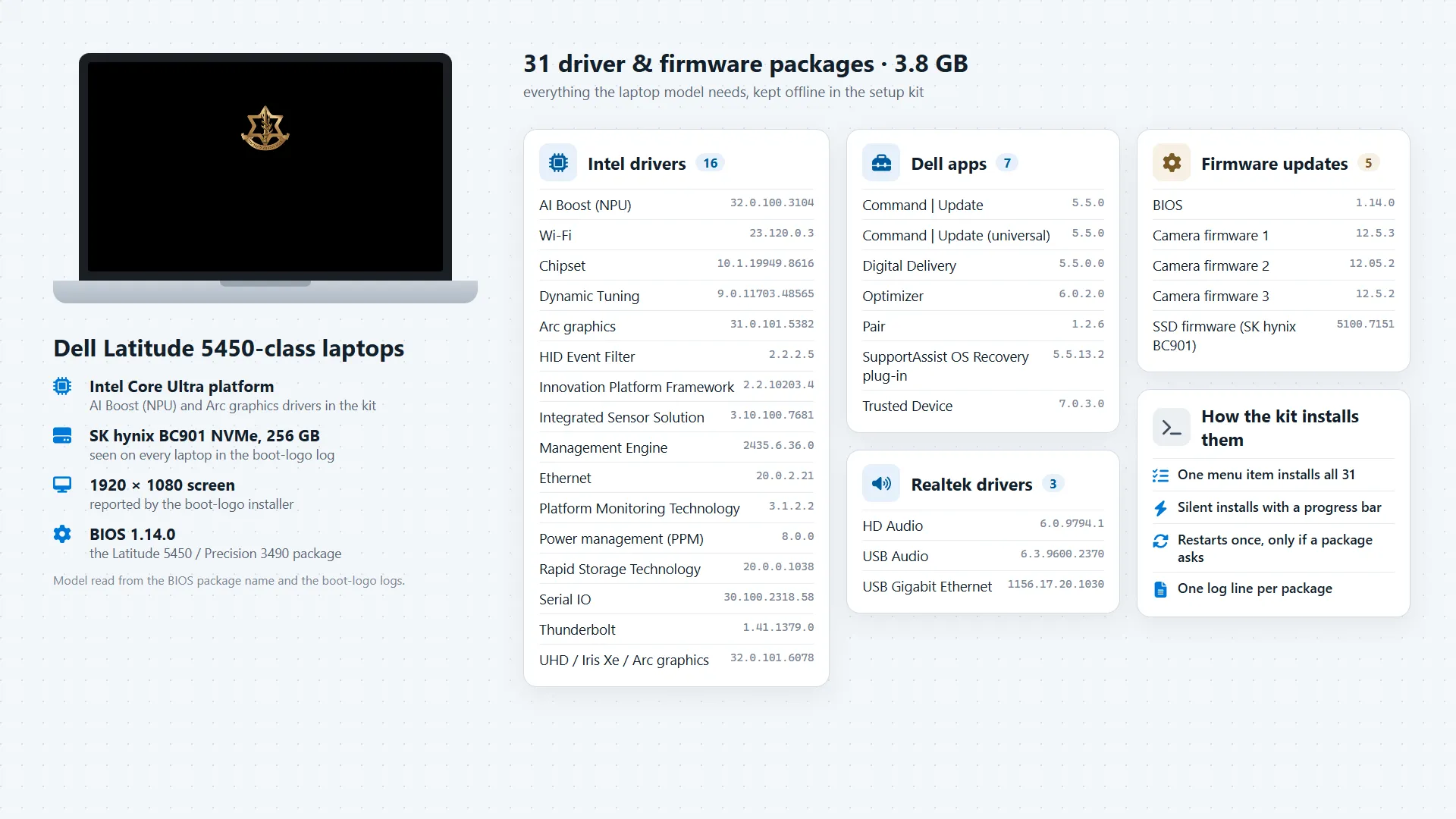
One menu does the few steps that differ from computer to computer: its name and joining the center's network, the boot logo and locking the desktop. It also installs 31 driver packages, and every step is recorded.
Exam-day protections built in
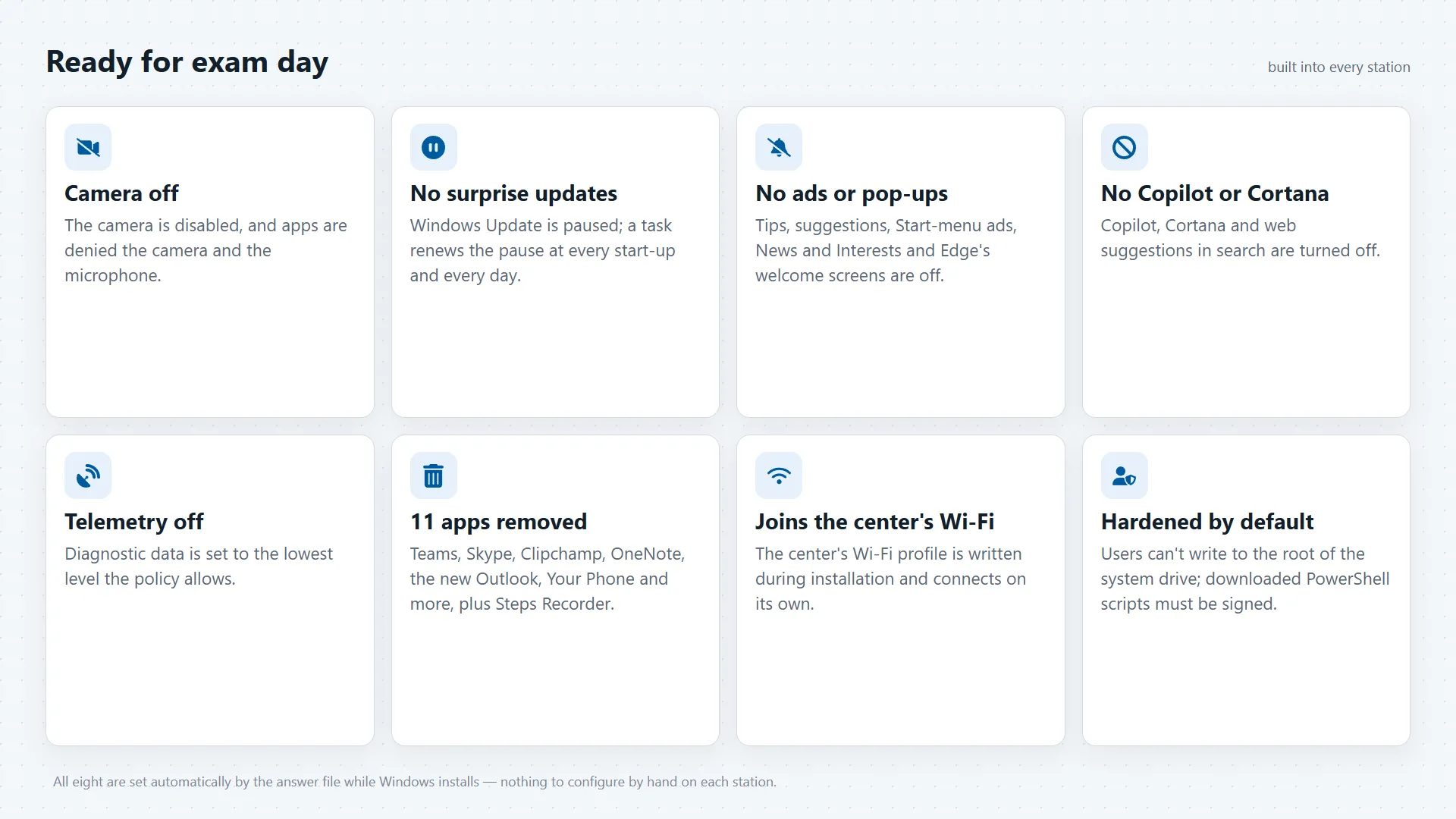
Camera off, no surprise updates, no ads, pop-ups or Copilot, and 11 unneeded apps removed, all built into every station.
Central management
Every station is managed from the center's own servers: the shared exam files and the mail, with a backup copy.
AI-assisted engineering
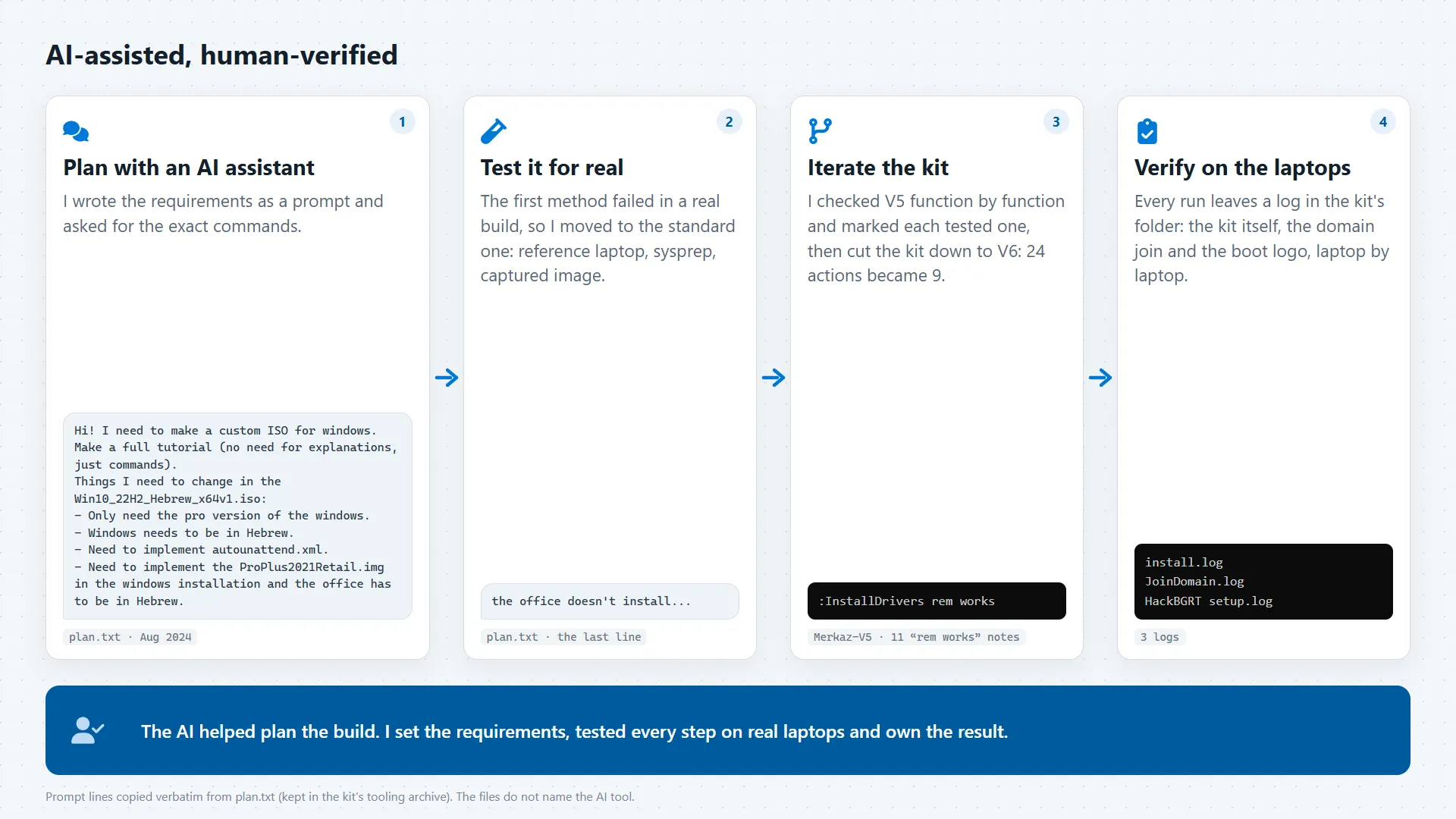
I planned the build with Gemini and ChatGPT from my requirements, then tested it on real laptops and refined it version by version.
04 / Screens
10 screens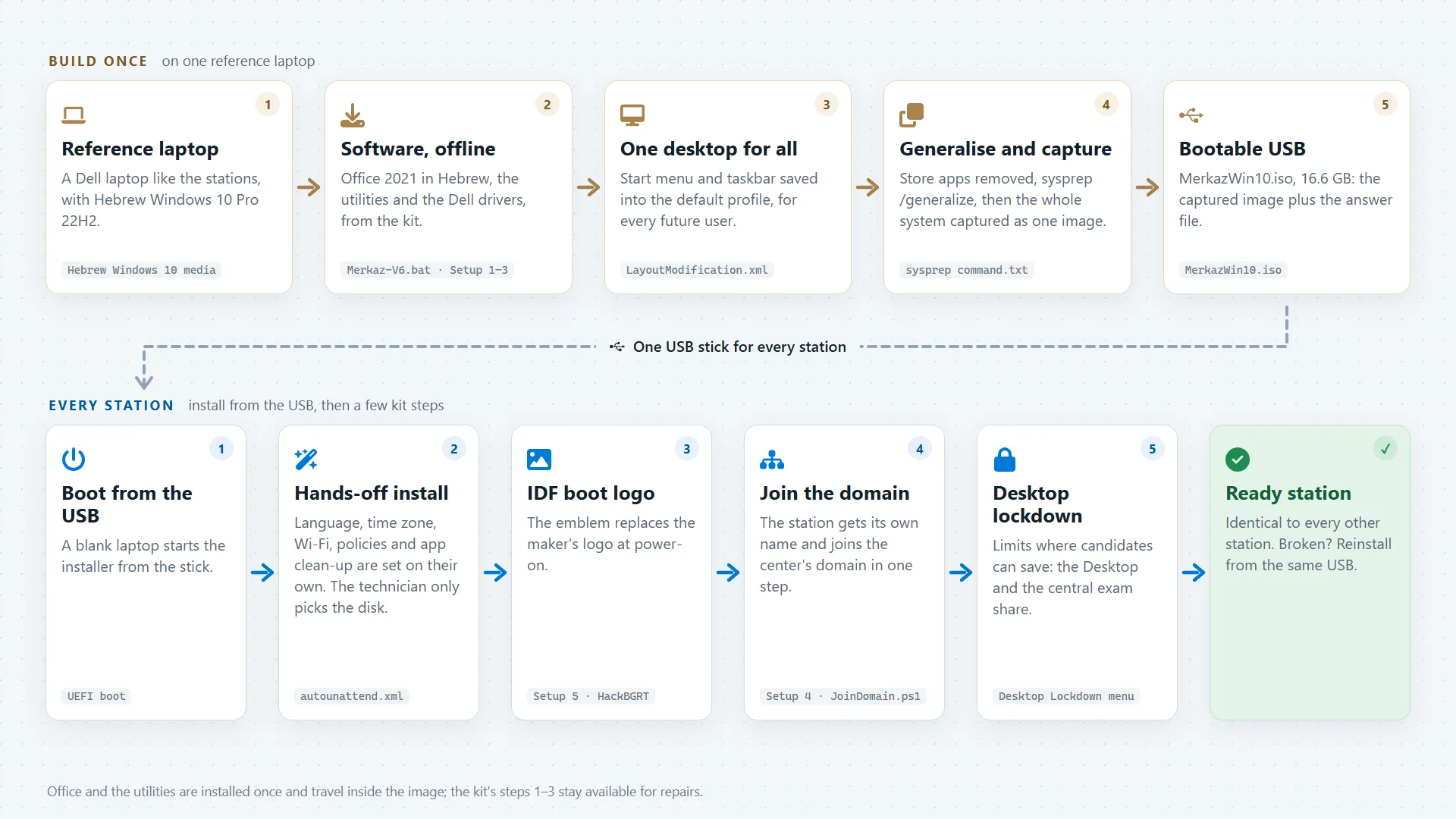

05 / Impact
The center's IT went from preparing each computer on its own to one organised, repeatable workflow: build the image once, install any station from one USB stick, and finish it with a few logged steps. 44 stations in 16 rooms were installed from the image, and about 12 assessment cycles of four days each ran on them. Preparing a station took 20 minutes instead of 4–6 hours by hand, and stations were reinstalled from the USB stick 7 times.
On every station a candidate gets the same system, apps and settings, with the exam-day protections built in. A faulty station goes back to the known state from the same USB stick, and every step leaves a log, so what happened on each laptop can be checked. As the common setup moved into the image, setting up each computer shrank from 24 steps to 9.
06 / Role and tech
I was in charge of modernising the assessment center's IT, from the plan to the rollout. I worked out what the stations need on an assessment day, then planned, tested and built the whole station side on my own: the unified Windows image and its answer file, the setup kit and its logs, and the one-step domain join. Noam Shadmi and I set up the server side together: the domain controller, the shared drives and the Exchange mail server.
I used Gemini and ChatGPT as planning partners: I wrote my requirements as a prompt and asked for the exact commands, then tried the plan on real hardware. When the first method failed, I moved to the standard enterprise method (a reference laptop, sysprep and a captured image), tested the kit function by function, and verified the rollout in the logs. The AI made me faster; the design, the testing and the result are mine.
Tech
- Windows 10 Pro 22H2
- autounattend.xml
- Sysprep
- Windows ADK (OSCDIMG)
- PowerShell
- Batch
- Office Deployment Tool
- Active Directory
- Windows Server 2022
- Microsoft Exchange
- VirtualBox
- HackBGRT
- Office LTSC 2021
- Gemini
- ChatGPT
How it's built
The image is Hebrew Windows 10 Pro 22H2, set up on a reference laptop, generalised with sysprep and captured as one install.wim. The Windows ADK's OSCDIMG built the 16.6 GB bootable ISO around it, with an autounattend.xml answer file that sets the language and runs four PowerShell phases for network, policies and clean-up. The kit is a menu-driven Batch script plus a PowerShell domain-join script; Office installs offline through the Office Deployment Tool, and HackBGRT sets the boot logo. The servers run Windows Server 2022 with Active Directory and Exchange, as VirtualBox virtual machines. Installed, it takes 40.5 GB on each station, all of it from one USB stick.
I turned the assessment center's computers from one-off setups into one repeatable process.
Build the image once, install any station from one USB stick and check every step in the logs.